Objective
Discover and analyze the Local Area Network, known as LAN, structure in your home by identifying network devices, topology, and addressing schemes. This hands-on exercise will help you understand how real-world networks are organized.
Learning Outcomes
By completing this exercise, you will be able to:
Identify network devices and their roles in your home network
Determine the network topology being used
Find and interpret physical MAC addresses and logical IP addresses
Understand how devices communicate within a LAN
Create a network diagram based on real infrastructure
Materials Needed
Your home computer or laptop, running Windows, Mac or Linux
Access to your home router or modem
A smartphone or a tablet if available
Part 1: Physical Device Discovery
Tasks:
Locate your networking hardware:
Find your modem, which connects to the ISP, and your router, which may be combined with the modem in one device
Note the model and manufacturer
Take a photo of or sketch the device, showing the ports and connections
Count connected devices:
List all devices connected to your network, such as computers, phones, smart TVs, IoT devices and printers
Identify how each device connects, either wired through an Ethernet cable or wireless through Wi-Fi
Examine physical connections:
Look at the back of your router, count the Ethernet ports
If possible, trace where the Ethernet cables lead
Observe any additional networking equipment, such as switches, access points and repeaters
Part 2: Network Configuration Analysis
Open Command Prompt by searching for
cmdType
ipconfig /alland press EnterTake a screenshot or write the values down, and explain what each of these is and what its format looks like:
Your computer’s IP address
The subnet mask
The default gateway, which is the IP address of your router
The physical address, which is the MAC address
Part 3: Network Topology Identification
Tasks:
Based on your observations, identify the topology:
How are devices connected to the router?
Is there a central device that all others connect through?
Are devices connected in a line, or do they each have independent connections?
Determine if you have:
Bus topology
Pure star topology
Extended star, meaning a star with additional switches
Hybrid topology, a combination of topology types
Part 4: Create a Network Diagram
Tasks: draw a complete network diagram that includes:
Your external ISP connection
The modem and router, labeled with the model and the IP address
All connected devices with:
Device name and type
Connection type, wired or wireless
IP address
MAC address, for at least 2 to 3 devices
Any additional networking equipment, such as switches and access points
Appropriate symbols or shapes to differentiate device types
Diagram tips:
Place the router or switch at the center
Draw lines showing connections, with solid lines for wired links and dashed lines for wireless links
Label everything clearly
Use colors or different line styles to make the diagram more readable
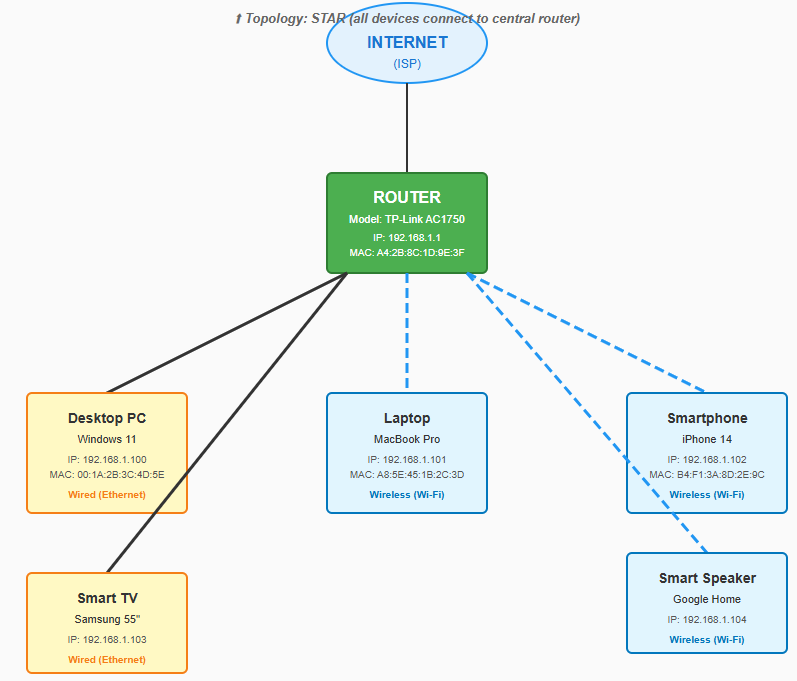
An example network diagram from the statement PDF.
Part 5: Analysis Questions
Answer the following questions based on your exploration:
Topology: which network topology does your home network use? Justify your answer.
Addressing:
What is the IP address range used in your network?
Are the IP addresses private or public? How can you tell?
How do you think devices receive their IP addresses?
Central device:
What is the role of your router in the network?
What would happen if the router stopped working?
Scalability:
How many devices can your network support?
What would you need to add if you wanted to connect more devices than the available ports can handle?
Comparison:
How does your home topology compare to a bus topology?
What are the advantages of your current setup?
Deliverables
Submit the document including the following:
A network diagram with all required labels
A list of all devices with their IP and MAC addresses, at least for your own device
Screenshots of your
ipconfigorifconfigoutputPhotos of your router and networking equipment if available
Written answers to all analysis questions, 1 to 2 paragraphs each
Your submission should be written in Microsoft Word in docx format and named with <StudentID>.docx where <StudentID> is your Student ID, for example 25123456.docx.